 Macropass
AI macro tracker for iPhone and Android
The AI macro tracker you can actually trust.
Describe a meal (type it, say it, or snap it) and the AI logs it, showing exactly how it got its numbers: every ingredient, every assumption, fixable in one sentence before anything counts. Your own ChatGPT or Claude can log to the same diary.

 In review on Google Play
14-day free trial, then Macropass Pro at $9.99 per month or $49.99 per year.
Updated September 2026
What is Macropass?
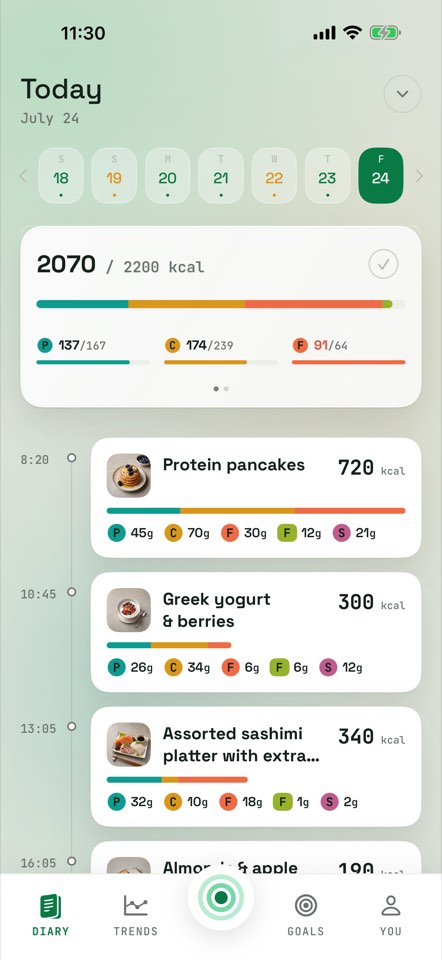
Macropass is an AI macro tracker made by Geometry, at macropass.app. You log a meal by typing, talking, or snapping a photo, or you log meals from Claude or ChatGPT into a real diary. There is no food database to search, no forms, and no barcode scanner. Macropass tracks six values: calories, protein, carbs, fat, fiber, and sugar. Calories, protein, carbs and fat are targets; fiber is a minimum; sugar is a maximum.
Macropass at macropass.app is unrelated to any earlier app that used the same name.
- Calories
- Protein
- Carbs
- Fat
- Fiber
- Sugar
How do you log a meal in Macropass?
Macropass logs your meals from a sentence, a voice note, or a photo. The AI does the estimating and shows its math; you just confirm. You can log a meal by typing, talking, or snapping a photo; traditional calorie trackers make you search a database, pick a portion, and fill in forms. Full walkthrough: how Macropass works.
Write a sentence
"Protein pancakes with berries." That is the whole log. The AI estimates calories, protein, carbs, fat, fiber, and sugar from your words.
Say it out loud
Hold to talk while you cook, drive, or walk out of the restaurant. The transcript becomes the meal. Guide: log meals by voice.
Photograph the plate
Snap a photo and the AI reads the plate. Photo is one of three inputs, not the whole app. Guide: log meals from a photo.
The Macropass draft
How accurate is the Macropass AI?
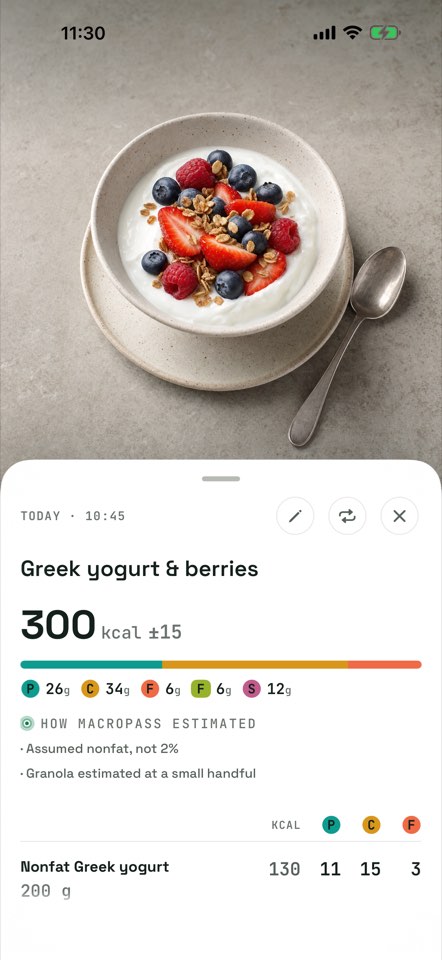
Every estimate is a draft. Macropass keeps the words you used, lists every ingredient with its calories, states the assumptions the AI made, shows an uncertainty band on the calories, and lets you correct anything in one sentence. Nothing counts until you confirm. That is what a calorie estimate that shows its assumptions means in practice. Details: how accurate is Macropass.
You: "make it a double"
Macropass: updates every ingredient and total in the draft.
Talk-to-Track
What happens in the diary when a meal lands?
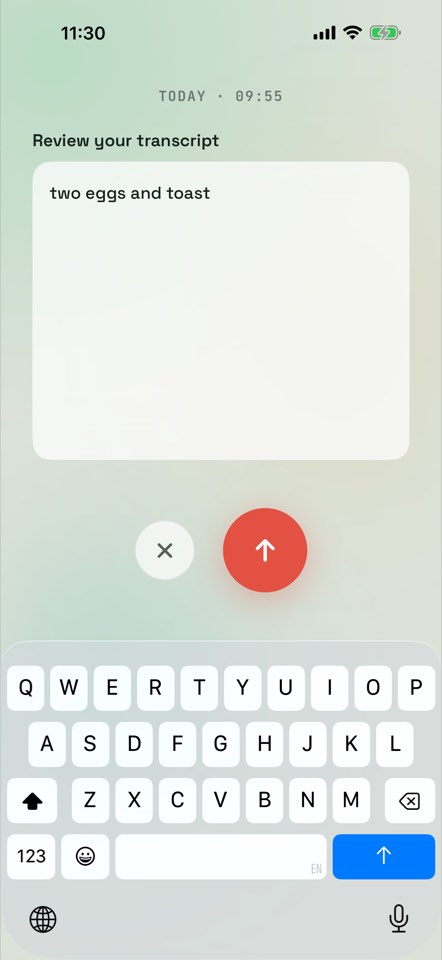
The calorie bar and macro strip update the moment a meal is added. Mark a day done when you are finished. There are no streaks and no red failure screens. Hold the ring, say what you ate, review the transcript, done: tracking nobody at the table notices.
Over your fiber minimum? That is a win, and the diary shows it as one. A missed day is a gap, not a failure.
Bring your own AI · MCP
Can Claude or ChatGPT log my meals?
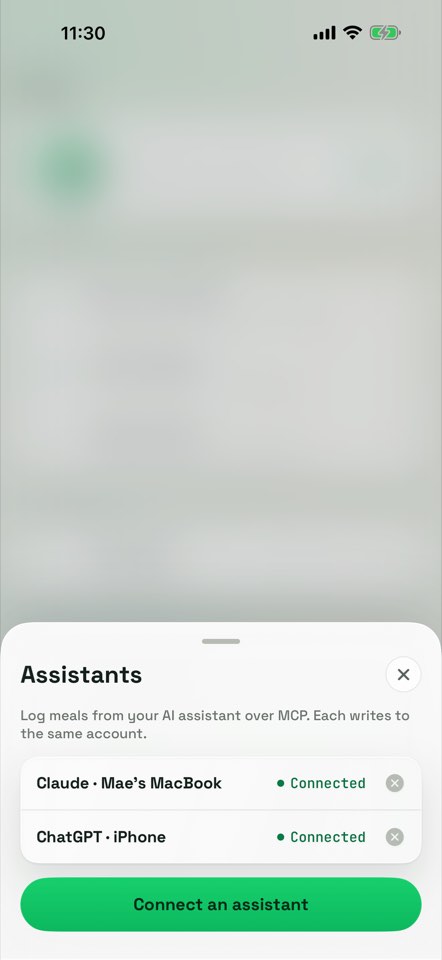
Yes. Connect Claude, ChatGPT, or any custom MCP client. Describe what you ate in the chat and your assistant logs calories, protein, carbs, fat, fiber, sugar and the full ingredient breakdown into your Macropass diary. It can also read today's totals, search and edit your meal history, and log weigh-ins. Setup and limits: log meals from Claude or ChatGPT into a real diary.
A connected assistant estimates with its own model. It never uses Macropass photo, voice or AI estimation, and it cannot change goals, save recipes, or export your data. Photo and voice logging stay inside the Macropass app.
Claude: "720 kcal · P 42g · C 84g · F 24g · fiber 10g · sugar 18g. Logged to Macropass."
The memory layer
The dashboard your ChatGPT food log never had
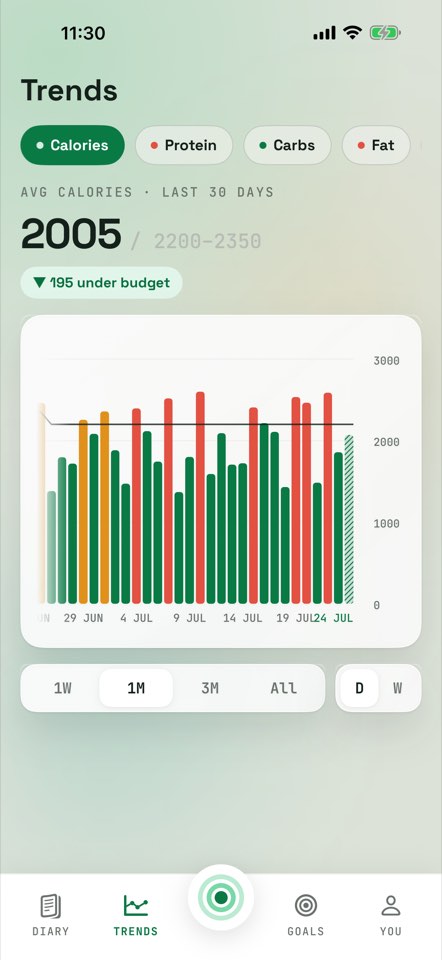
A raw AI chat forgets yesterday. Macropass keeps a real diary: running totals, weekly protein averages, weight over time, and different macro targets for training days and rest days. Everything you or your assistant logs lands in the same account.
Repeat meals in one tap. Macropass remembers meals you log, so a usual breakfast is one tap away.
Cycle your week. Set different calorie and macro targets for training days and rest days while keeping the weekly plan visible. Guide: macro targets by weekday.
Weight and trends. Log weigh-ins, follow your weight trend, and run a weight program. A connected assistant can log and read weigh-ins too. Optional Apple Health sync, off by default.
Your data is yours. No ads. One-tap export of your data.
What does Macropass not do?
Macropass does not have a food database, a barcode scanner, micronutrients beyond the six values, exercise or water tracking, social features, a watch app, or a web dashboard. It is a general wellness tool, not a medical device. Connected assistants cannot call Macropass photo, voice or AI estimation. Stated plainly so you can pick the right tool: who Macropass is not for.
Built for you if
- You quit trackers because logging is a chore. The add-food form is why you quit tracking, and Macropass removes it.
- You already ask your AI what is in your food and hit the wall: the chat forgets. No running total, no trend, no calories remaining.
- You chase protein and macro targets and want different numbers on training and rest days.
Not for you if
- If you weigh your food and verify against labels, use MacroFactor or Cronometer. If you quit trackers because logging is a chore, or you already ask your AI what is in your food, Macropass is built for you.
- You need micronutrients. Macropass tracks six values by design, no vitamins or sodium: Cronometer is the app for that.
- You want streaks, badges, and challenges. The calm is the product here.
How does Macropass compare to MyFitnessPal, Cal AI and MacroFactor?
Macropass is a macro tracker without a food database or barcode scanner; the apps below lead with a database, a photo scanner, or coaching. Every app in this table is good at what it leads with. Full pages: vs MyFitnessPal, vs Cal AI, vs MacroFactor, vs Cronometer.
| Fact | Macropass | Cal AI | MyFitnessPal | MacroFactor |
|---|---|---|---|---|
| How you log | Describe it: text, voice, photo; no database, no barcode | Photo first; barcode, label scan, text describe | Database search free; barcode, AI photo and voice in Premium | Search, barcode, typed or spoken "Describe", AI photo |
| Shows the AI's assumptions per estimate | Yes: verbatim input, item list, stated assumptions, calorie band | Not documented by the vendor; editable component breakdown | Not documented by the vendor; detect then confirm or edit | Not documented by the vendor; editable per-food editor |
| Claude or ChatGPT can log a meal over MCP | Yes: Claude, ChatGPT, custom MCP | No | No; its ChatGPT integration answers questions only | No official integration |
| Food database | None, by design | MyFitnessPal's database since the acquisition | "20.5M+ foods, including restaurant dishes" | "more than 1,360,000 verified items" |
| Macro targets by weekday | Yes | No evidence in any listing | Yes, Premium | No saved weekday schedule; targets editable day by day |
| Streaks | None | Yes, with a paid streak restore | Yes, two streaks | Yes, on the dashboard |
| Price and trial | $9.99/mo, $49.99/yr, 14-day trial, no free tier | About $29.99/yr or $9.99/mo, 3-day trial, free tier | Premium $19.99/mo or $79.99/yr, 7-day trial, free tier with ads | $11.99/mo or $71.99/yr, 7-day trial, no free tier |
Choose Cal AI if you want photo-first logging with the MyFitnessPal database behind it and a 3-day trial. Choose MyFitnessPal if you want the largest food database, barcode scanning, and a free tier with ads. Choose MacroFactor if you want adaptive calorie coaching that adjusts your targets from your logged weight and intake.
How much does Macropass cost?
14-day free trial, then Macropass Pro at $9.99 per month or $49.99 per year (about $4.17 per month). The subscription unlocks the whole app. In-app AI estimation and logging from a connected assistant are both included; connected assistants use their own model and cost nothing extra. No free tier, no ad tier. Details: Macropass pricing.
Cancel anytime in your App Store or Google Play subscription settings.
Macropass is a general wellness tool, not a medical device. Nutrition estimates may be incomplete or inaccurate and do not provide medical advice.
Frequently asked questions about Macropass
Short answers to the questions people ask before installing. The full list is on the Macropass FAQ.
What is Macropass?
Macropass is an AI macro tracker made by Geometry, at macropass.app. You log a meal by typing, talking, or snapping a photo, or from Claude or ChatGPT over MCP. It tracks calories, protein, carbs, fat, fiber, and sugar. Macropass at macropass.app is unrelated to any earlier app that used the same name.
Does Macropass work with ChatGPT or Claude?
Yes. Connect Claude, ChatGPT, or any custom MCP client. Describe what you ate in the chat and your assistant logs calories, protein, carbs, fat, fiber, sugar and the full ingredient breakdown into your Macropass diary. It can also read today's totals, search and edit your meal history, and log weigh-ins. Photo and voice logging stay inside the Macropass app.
How accurate is the Macropass AI?
Every estimate is a draft. Macropass keeps the words you used, lists every ingredient with its calories, states the assumptions the AI made, shows an uncertainty band on the calories, and lets you correct anything in one sentence. Nothing counts until you confirm. If you need label-verified numbers, use MacroFactor or Cronometer.
Is there a food database or barcode scanner?
No, by design. Type a description, hold to talk, or snap a photo. There is no food database, no barcode scanner, and no macro-by-macro form. The description is the input, and the AI's visible math is the safeguard.
How much does Macropass cost? Is there a free trial?
14-day free trial, then Macropass Pro at $9.99 per month or $49.99 per year (about $4.17 per month). There is no free tier and no ad tier. The subscription unlocks the whole app, including logging from a connected assistant.
Does Macropass track micronutrients?
No. Six values per meal and per day: calories, protein, carbs, fat, fiber, and sugar. Calories, protein, carbs and fat are targets; fiber is a minimum; sugar is a maximum. No vitamins, sodium or other micronutrients, by design. Cronometer is built for that.
Is Macropass available on Android?
Yes. Macropass is available on iPhone and Android. Claude or ChatGPT on either platform can log to your Macropass diary over MCP.
Is there an Apple Watch app or a web version?
No. Macropass is the iPhone and Android app plus your assistant connection over MCP. There is no watch app and no web dashboard. On a desktop, the way in is through Claude or ChatGPT connected over MCP.
Is my data private?
No ads. One-tap export of your data. Delete your account and synced data from Privacy & Data settings. Meal photos have location metadata removed before upload. Full policy: macropass.app/privacy.
Just tell it what you ate.
Describe a meal, check the Macropass draft, confirm. Your day updates the moment it lands.
In review on Google Play14-day free trial, then Macropass Pro at $9.99 per month or $49.99 per year. Available on iPhone and Android.