 Macropass
What can a connected assistant do in Macropass?
A connected assistant gets nine Macropass tools over MCP: log a meal, read today's meals and totals, list meal history, update a meal, delete a meal, search meals, log a weigh-in, read weight history, and delete a weigh-in. When you tell Claude "I had protein pancakes with berries", it estimates the six values and the ingredients with its own model and writes the complete record to your diary. Full reference: the Macropass MCP tools.
- Log a meal with a name, calories, protein, carbs, fat, fiber, sugar, and one row per ingredient, each with its own six values.
- Read today: the meals logged today and the calorie, protein, carbs, fat, fiber and sugar totals.
- List, search and correct history: "what did I eat last Thursday", "change yesterday's lunch to a double portion", "delete the duplicate coffee".
- Log, read and delete weigh-ins: "I weighed 82.4 kg this morning".
What can a connected assistant not do?
A connected assistant estimates with its own model. It never uses Macropass photo, voice or AI estimation, and it cannot change goals, save recipes, or export your data. Photo and voice logging stay inside the Macropass app. The assistant also does not receive your goals or remaining-target context: the "how much is left today" view lives in the app.
Whose model makes the estimate?
The assistant's own. Claude or ChatGPT reads your description, estimates calories, protein, carbs, fat, fiber and sugar for the meal and for every ingredient, and submits that record to Macropass. Macropass stores it exactly as submitted, with an optional assumptions list the assistant can include. The Macropass draft, the calorie band and the one-sentence correction are features of the app's own logging; a meal from an assistant is a complete record you can still edit in the app or ask the assistant to correct.
Why not just keep a food log in ChatGPT?
Because the chat forgets. A raw chat can estimate a meal well, but it has no running daily total, no week view, no protein average, no goals per weekday, and no editable history: tomorrow's conversation does not know about today's lunch. Macropass is the dashboard your ChatGPT food log never had: every meal your assistant logs lands in the same diary as meals you log in the app. Prompts that work in a raw chat, and where they break: how to track your macros with ChatGPT.
| Capability | Raw AI chat | Macropass + assistant |
|---|---|---|
| Remembers yesterday's meals | Only inside one conversation, if at all | Yes, every meal is in the diary |
| Running daily total | You must ask it to add up, and it may miss meals | Yes, live calorie bar and macro strip |
| Weekly protein average | No | Yes, in Trends |
| Different targets per weekday | No | Yes, training days and rest days |
| Editable history | No | Yes, from the app or the assistant |
| Export | Copy and paste | One-tap export of your data |
| Estimate with stated assumptions and a calorie band | If you ask for it, each time | In-app logging shows it on every draft |
Does the assistant connection need a subscription?
Yes. The subscription unlocks the whole app. In-app AI estimation and logging from a connected assistant are both included; connected assistants use their own model and cost nothing extra. 14-day free trial, then Macropass Pro at $9.99 per month or $49.99 per year. You bring your own Claude or ChatGPT account.
Which assistants are supported?
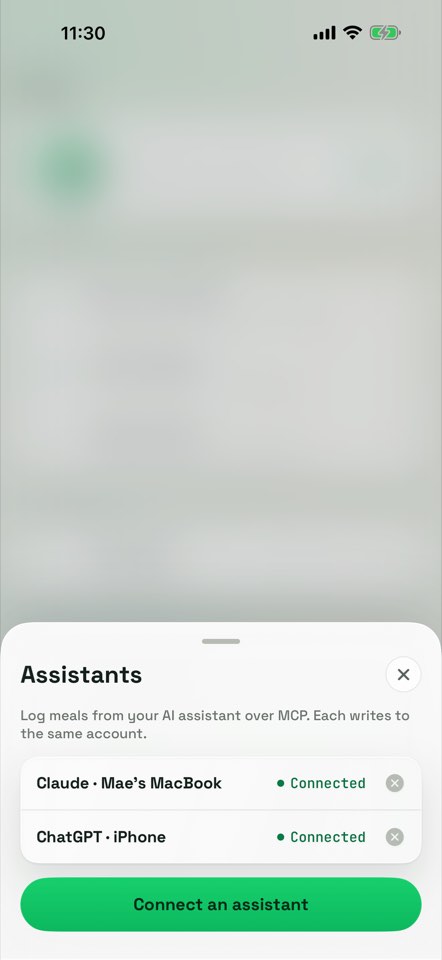
Claude and ChatGPT are guided step by step inside the app. Any custom MCP client that supports OAuth 2.1 with PKCE and dynamic client registration can connect to the same endpoint. Assistants connect over MCP with OAuth 2.1 and PKCE at auth.macropass.app. You approve the connection once and can revoke it in Macropass at any time. Setup: connect Claude or ChatGPT to Macropass.
Questions about Claude, ChatGPT and MCP
Does Macropass work with ChatGPT?
Yes. Add the Macropass MCP endpoint as an app in ChatGPT's developer mode, sign in with Macropass to authorize, then describe meals in the chat. ChatGPT logs them to your Macropass diary with its own estimate.
Does Macropass work with Claude?
Yes. Add the Macropass MCP endpoint as a custom connector in Claude's settings, sign in with Macropass to authorize, then describe meals in the chat. Claude logs them to your Macropass diary.
Can my assistant send a photo to Macropass?
No. A connected assistant never uses Macropass photo, voice or AI estimation. Photo and voice logging stay inside the Macropass app. Your assistant can describe a photo you show it in text and log that description.
Can my assistant read my goals?
No. It can read today's meals and totals and your history, and log meals and weigh-ins. Goals and remaining-target context stay in the app, and the assistant cannot change goals.
Do assistant meals use my AI allowance?
No. The allowance of 12 estimates per day covers Macropass's own estimator. Assistant meals are estimated by the assistant.
Can I connect both Claude and ChatGPT?
Yes. Each assistant connects independently and writes to the same account and diary. You can see and revoke each connection in Macropass.
Is there an API besides MCP?
No public REST API. MCP is the integration surface, and the nine external tools are documented at macropass.app/claude-chatgpt/tools.
Which platforms can the assistant log from?
Wherever Claude or ChatGPT runs: web, desktop, or mobile. Custom MCP connectors are added in the assistant's web settings and then sync to its mobile and desktop apps.