 Macropass
What does the Macropass draft show?
The Macropass draft shows five things for every estimate: the words you used, each ingredient with its quantity and calories, the assumptions list under "How Macropass estimated", a calorie band such as 720 kcal ±60, and the six totals: calories, protein, carbs, fat, fiber, and sugar. Any AI calorie estimate carries error; the Macropass design choice is to show where that error can come from instead of hiding it behind one number.
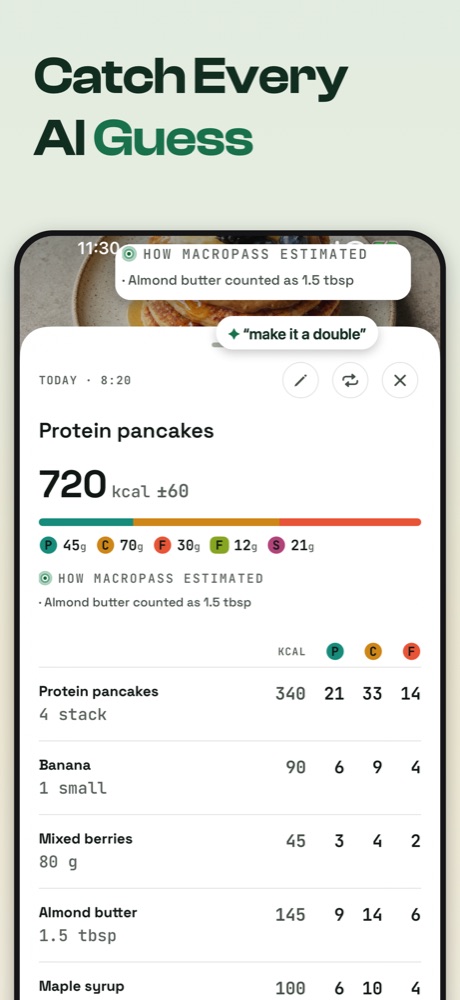
What kind of assumptions does the AI state?
Macropass states the portion and preparation assumptions the estimate depends on, in plain sentences. Real examples from the app: "Assumed nonfat, not 2%", "Granola estimated at a small handful", "Almond butter counted as 1.5 tbsp", "Assumed grilled, not fried". These are the places where an estimate most often goes wrong, so they are the lines to read first. If an assumption is wrong, you fix it in one sentence and every ingredient and total updates.
How do I correct an estimate?
Type or say one sentence to the draft: "make it a double", "no granola", "the yogurt was full fat", "the chicken was 250 g". Macropass re-estimates with your correction and shows the new items, assumptions and totals. You can also edit any ingredient row directly. In Confirm mode, the default, nothing lands in the diary until you tap confirm. If you prefer, meals log instantly and can be edited or deleted afterwards.
What is the uncertainty band?
The band is a plus-or-minus range on the calories, such as 300 kcal ±15, that Macropass stores with every meal. A wide band means the AI had to assume more (a restaurant plate photographed from one angle); a narrow band means you gave exact quantities. The band is on calories only. Macropass does not claim per-macro bands.
Why is there no food database?
Macropass has no food database and no barcode scanner by design. Searching a database, picking a portion and filling in forms is the friction that makes people quit tracking, and a database entry can be wrong too, without telling you why. In Macropass the description is the input and the visible math is the safeguard: you see the assumptions, not just the result. This is a trade: Macropass gives up label-verified numbers for auditable estimates.
When should I use a database tracker instead?
If you weigh your food and verify against labels, use MacroFactor or Cronometer. If you quit trackers because logging is a chore, or you already ask your AI what is in your food, Macropass is built for you. Cronometer is also the right pick if you track vitamins and minerals; Macropass tracks six values only.
What does each tracker show you about an estimate?
The table lists what each app documents about its own AI estimate. "Not documented by the vendor" means the vendor's listing, help center and pricing pages do not describe the feature; it is not a claim that the feature is absent.
| What you see | Macropass | Cal AI | MyFitnessPal | MacroFactor |
|---|---|---|---|---|
| Verbatim input kept | Yes, shown as "You said" | Not documented by the vendor | Not documented by the vendor | Not documented by the vendor |
| Ingredient breakdown | Yes, with quantities | Yes, editable components | Yes, detected items to confirm or edit | Yes, editable per-food "Plate" editor |
| Stated assumptions | Yes, listed per estimate | Not documented by the vendor | Not documented by the vendor | Not documented by the vendor |
| Uncertainty band | Yes, on calories | Not documented by the vendor | Not documented by the vendor | Not documented by the vendor |
| Correction in plain language | Yes, one sentence, before it counts | Yes: a "fix results" button to describe what was wrong | No; tap item, edit servings | At request time ("alter portions, exclude foods"); afterwards manual edit |
| Nothing counts until you confirm | Yes (Confirm mode, default) | Not documented by the vendor | Detect, then confirm or edit | Not documented by the vendor |
What does Macropass never claim?
Macropass never claims an accuracy superlative, never promises weight loss or any medical outcome, and never presents an estimate as verified. It is a general wellness tool, not a medical device. Nutrition estimates may be incomplete or inaccurate and do not provide medical advice. The claim Macropass does make: you can read the math and fix it in a sentence before anything counts.
Questions about accuracy
Is the AI calorie estimate accurate?
It is an estimate with a stated band, not a verified number. Macropass shows the ingredient breakdown, the assumptions and a calorie band so you can judge and correct it before it counts. If you need label-verified numbers, use MacroFactor or Cronometer.
Can I see why the AI chose a number?
Yes. Every draft lists the assumptions under "How Macropass estimated" and the calories per ingredient. That is the reasoning, in plain sentences.
Does Macropass learn from my corrections?
Your corrections update that meal and are kept with it. Macropass remembers meals you log, so a corrected usual meal is one tap away next time. Macropass does not claim a personal model that learns from you.
Is the uncertainty band on protein and carbs too?
No. The band is on calories only. Protein, carbs, fat, fiber and sugar are shown as single estimates you can edit.
Who should not use an AI estimate?
If you weigh your food and verify against labels, use MacroFactor or Cronometer. Anyone under medical or dietetic supervision should follow that advice; Macropass is not a medical device.
Do connected assistants show assumptions too?
A connected assistant estimates with its own model and can send an optional assumptions list with the meal; the Macropass draft, band and one-sentence correction apply to meals you log inside the app.