 Macropass
How do I log a meal by typing?
Type one sentence in the Macropass composer, such as "protein pancakes with berries", and Macropass returns a draft with calories, protein, carbs, fat, fiber, and sugar for the whole meal and for each ingredient. There is no food database to search and no portion picker: the sentence is the input. Quantities you mention ("two eggs", "180 g chicken") are used as stated; quantities you omit are estimated and listed as assumptions in the draft.
Brand names and restaurant dishes work as text too. If the description is too thin to estimate, Macropass asks for a detail such as a serving size instead of guessing silently.
How do I log by voice?
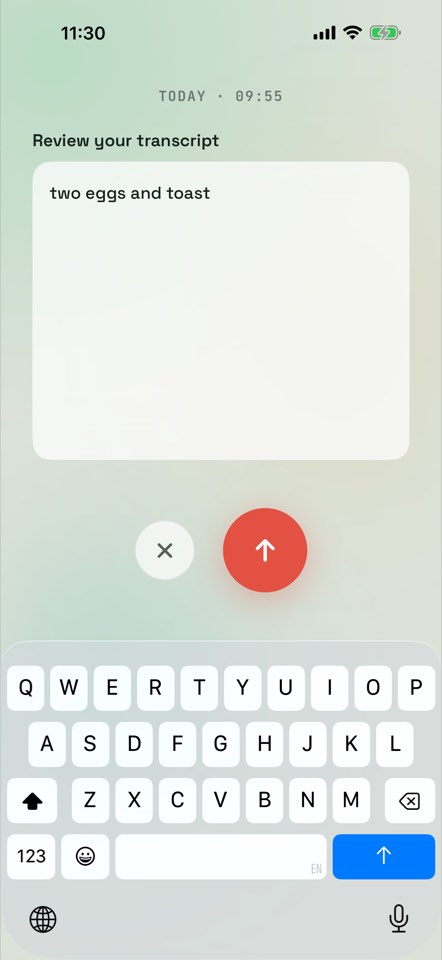
Hold the ring in the Macropass composer, say what you ate, and release. Macropass shows the transcript for review before it estimates, so a misheard word never becomes a logged meal. The transcript then becomes the same kind of draft as a typed sentence: items, assumptions, calorie band, one-sentence correction. This is the way to log a meal while cooking, driving, or leaving a restaurant. Walkthrough: log meals by voice.
How do I log from a photo?
Snap a photo of the plate and Macropass reads it into a draft: the foods it recognised, the portions it assumed, calories, protein, carbs, fat, fiber, and sugar, and the calorie band. Photo is one of three inputs, not the whole app; you can add a sentence to the photo ("that is a double portion of rice") and the draft updates. Meal photos have location metadata removed before upload. Walkthrough: log meals from a photo.
What is the Macropass draft?
Every estimate is a draft. Macropass keeps the words you used, lists every ingredient with its calories, states the assumptions the AI made, shows an uncertainty band on the calories, and lets you correct anything in one sentence. Nothing counts until you confirm. The draft is the trust layer: a calorie estimate that shows its assumptions instead of a bare number.
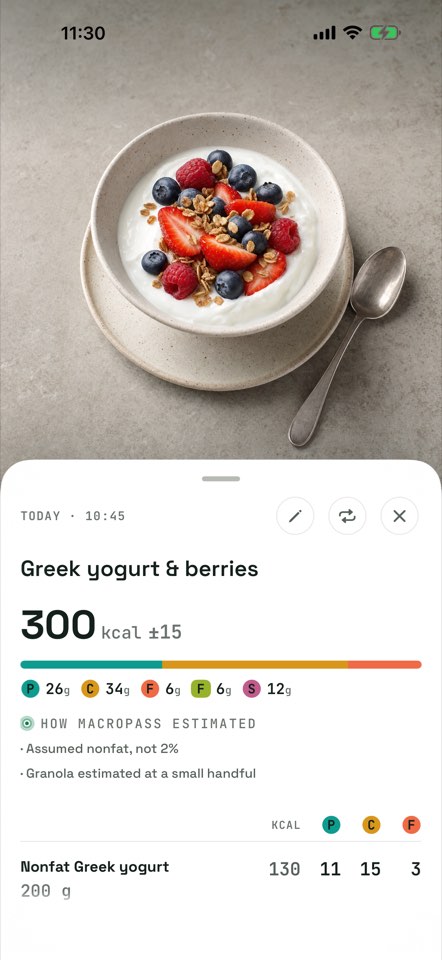
The draft has five parts:
- Your words, kept verbatim, so you can see what the estimate was based on.
- The item breakdown: each ingredient with its quantity and calories, protein, carbs and fat.
- The assumptions list, under "How Macropass estimated": lines such as "Assumed nonfat, not 2%" or "Almond butter counted as 1.5 tbsp".
- The calorie band, such as 300 kcal ±15, on the calories only. Macropass does not claim per-macro bands.
- A one-sentence correction: type "make it a double" or "no granola" and every ingredient and total updates before you confirm.
If you prefer, meals log instantly and can be edited or deleted afterwards. That is Auto mode, a setting; Confirm mode is the default. The accuracy page goes deeper: how accurate is the Macropass AI.
What happens in the diary when a meal lands?
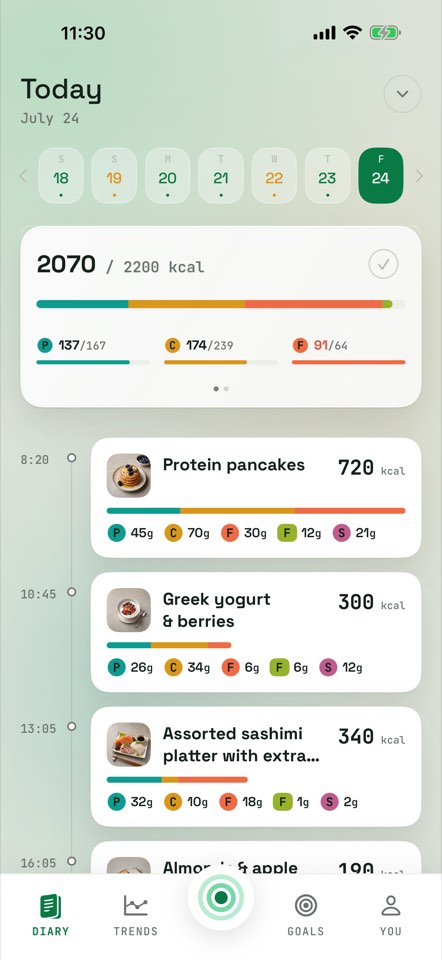
The calorie bar and macro strip update the moment a meal is added. Mark a day done when you are finished. There are no streaks and no red failure screens. Six values are tracked per meal and per day: calories, protein, carbs, fat, fiber, and sugar. Calories, protein, carbs and fat are targets; fiber is a minimum; sugar is a maximum, so going over your fiber minimum shows as a good thing.
Can I repeat a usual meal?
Yes. Macropass remembers meals you log, so a usual breakfast is one tap away. Repeating a saved meal does not use an AI estimate, so it stays available even when you have used your daily allowance. There is no recipe library and no sharing feature; the repeat comes from your own history.
How many AI estimates do I get?
Up to 12 AI estimates per day and 120 per month (50 during the trial). Saved-meal reuse and manual logging always remain available. A correction to a draft counts toward the allowance; repeating a saved meal does not. Meals logged by a connected assistant do not count either, because the assistant estimates with its own model.
Can Claude or ChatGPT log to Macropass?
Yes. Connect Claude, ChatGPT, or any custom MCP client. Describe what you ate in the chat and your assistant logs calories, protein, carbs, fat, fiber, sugar and the full ingredient breakdown into your Macropass diary. It can also read today's totals, search and edit your meal history, and log weigh-ins. Everything else about the assistant path is on the Claude and ChatGPT page.
What does Macropass not do?
Macropass does not have a food database, a barcode scanner, micronutrients beyond the six values, exercise or water tracking, social features, a watch app, or a web dashboard. It is a general wellness tool, not a medical device. A connected assistant estimates with its own model. It never uses Macropass photo, voice or AI estimation, and it cannot change goals, save recipes, or export your data.
Questions about logging in Macropass
Do I need to weigh my food?
No. Say the quantity if you know it ("180 g chicken") and Macropass uses it. If you do not, Macropass assumes a portion and lists that assumption in the draft so you can change it in one sentence. If you weigh your food and verify against labels, use MacroFactor or Cronometer.
Can I fix a meal after it is logged?
Yes. Open the meal, edit any ingredient or total, or re-run the draft with a correction. Meals logged by a connected assistant can be corrected from the app or from the assistant.
Does Macropass work offline?
Reading your diary works offline. Producing a new AI estimate needs a connection, because the estimate is made on Macropass servers. A repeat of a saved meal does not need an estimate.
Does a photo need to show the whole plate?
It helps. Macropass estimates from what it can see and lists the portion assumptions it made. Add one sentence with anything hidden, such as dressing or a second helping, and the draft updates.
What if the AI cannot estimate my description?
Macropass asks for the missing detail, usually a brand, a serving size, or a label photo, instead of logging a guess. Nothing counts until you confirm.
Is there a food database or barcode scanner?
No, by design. Type a description, hold to talk, or snap a photo. There is no food database, no barcode scanner, and no macro-by-macro form.